Cut & Emboss Folders Inspiration | Blessings Card with Ilina
Posted by Spellbinders Team on July 27, 2018

Cut & Emboss Folders Inspiration | Blessings Card with Ilina

Hello everyone. Ilina Crouse here today. I am honored to be guest designing for Spellbinders and showing you a project using the new Cut & Emboss Folders.  If you are not familiar with these, they are amazing. They cut and emboss at the same time!!!! (hence their name). I was very intrigued when I saw them and had to play with them immediately. They give very nice and crisp embossed image and at the same time cut parts of it. It's like a multitasking embossing folder.
Spellbinders Cut & Emboss Folders Inspiration | Blessings Card with Ilina #spellbinders #neverstopmaking

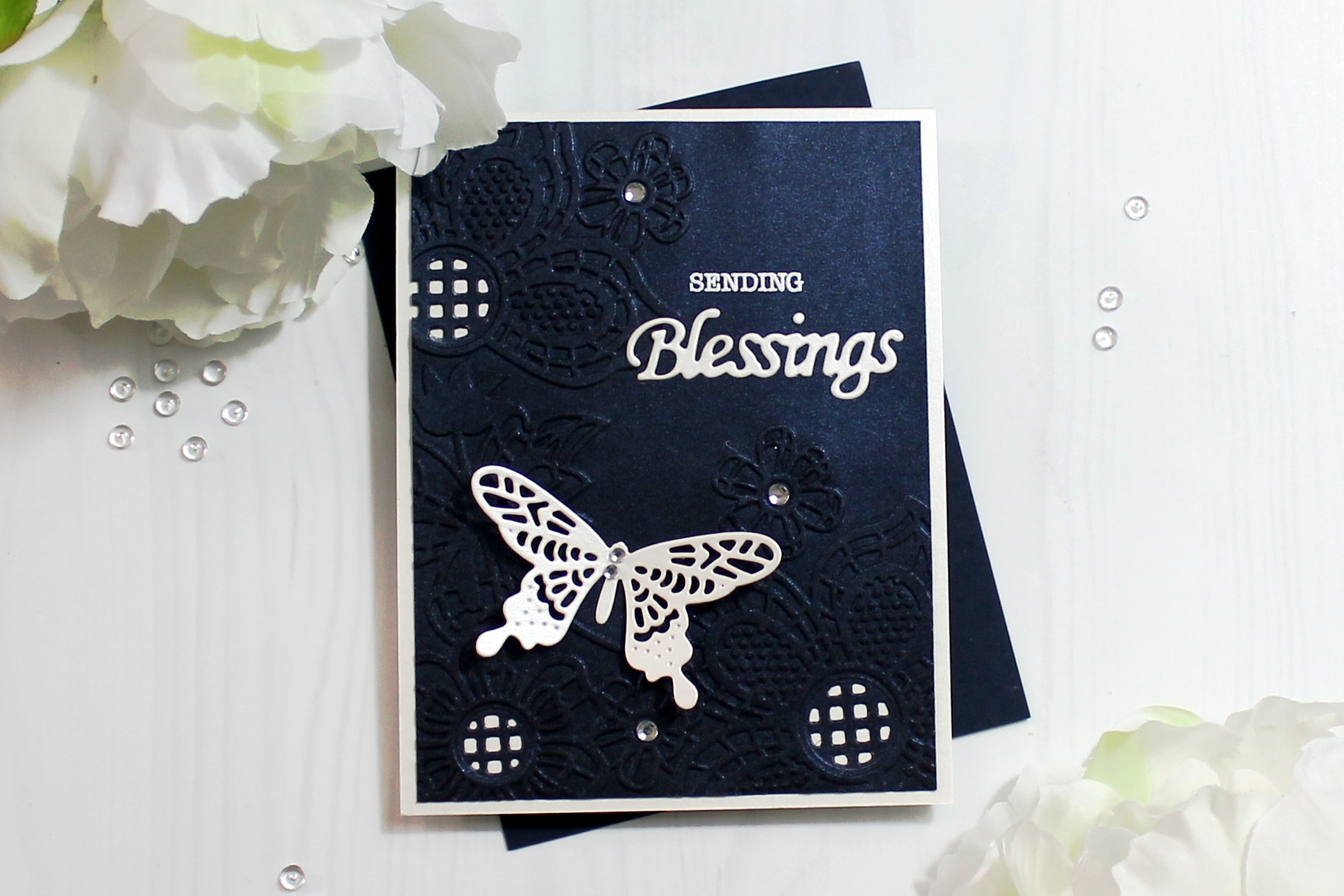
For my card today I used the Floret Cluster Cut and Emboss folder to emboss (and cut) piece of shimmer navy card stock. I wanted to keep my card simple but with interest, so I used shimmer card stock. Once I ran it through my die cutting machine I cut the panel down to 4" x 5 1/4" and set it aside. Using cream shimmer card stock I die cut a butterfly from the Wandering Butterflies dies and the Blessings sentiment from the Blessings Vine Frame dies. Applied adhesive on the back and adhered to the navy panel. Next I stamped the sentiment "sending" above blessings and embossed using white embossing powder.

Spellbinders Cut & Emboss Folders Inspiration | Blessings Card with Ilina #spellbinders #neverstopmaking

To make the card I created top folding note card using the same shimmer cream card stock. Adhered the navy panel to it and added rhinestones to finish it off.

Spellbinders Supplies:

Other supplies: Paper Source cream shimmer card stock, Navy shimmer Card stock, Versamark ink pad, White embossing powder, Rhinestones. Thank you so much for joining me and I hope you are inspired to do something creative today.

Leave a comment

Your email will not be published. Please note, comments need to be approved before they are published.

8 comments

Yana Smakula,

hello Pat,
the sandwich for this embossing folder is the same as for any other regular embossing folder. Please check your machine manual to see what plates/platforms you need to use for it. If you are still having trouble sending it though the machine, please contact our Customer Support Team PHONE: 1-888-547-0400

E-MAIL: customersupport@spellbinders.us

Pat Johnson,

I am having difficulty passing this folder through my Big shot, Can you tell me the sandwich i should be using>
Thankyou

Beverly Jordan,

This is so beautiful and LOVE that you made it in black! Gorgeous designs with the cut out places too!

Denise,

Love the new die cut embossing folders and the great ideas posted.

lorraine turner,

Now I have seen more than one project done with these Spellbinders embossing and cutting folders I really want to have a go myself. Thank you for sharing this with us crafters. :O) xxxx


  • Just Add Cake, S3-495, S4-1522, S5-635, S4-1450, S4-1476

    Spellbinders Blog

    Create an Easy Interactive Birthday Card with Spellbinders Card Spinners

    Hi, crafty friends! Lisa Tilson here, and I'm delighted to be with you today sharing a fun interactive birthday card featuring the new Spellbinders Card Spinners. If you've ever wanted to add movement to your handmade cards without complicated mechanisms, these spinners make it incredibly easy! For today's project, I'm using the Large Card Spinner to create an adorable birthday monster that spins with just a...

  • Colorful Halloween Card Tutorial with Scalloped Frames, E3D-180, S6-272

    CS-8-101

    Halloween Card with Embossed Scalloped Frames and Drac Die Set

    Turn layered scalloped frames into a colorful Halloween gallery wall! This step-by-step tutorial shows how to emboss and arrange the Scalloped Frames, assemble the adorable Drac character from Simon Hurley's Halloween Hugs Collection, and create a playful handmade Halloween card full of dimension and color.